
How To Built Liquid Glass in WebGL (And Why Mobile Browsers Hate It)
Deep dive into how the liquid glass on this website works
Most glass effects on the web today feel flat. You slap backdrop-filter: blur(20px) and a semi-transparent white background onto a card, add a subtle border, and call it a day. It looks decent, but it doesn't look like actual glass. Real glass has volume. It bends light, creates chromatic fringes at the edges, distorts whatever sits behind it, and has glossy bevels that catch ambient illumination.
When building the interface for this website, I wanted something that felt tactile and alive. Not just a frosted sticker, but an interactive, optical lens floating over a fluid, dynamic background.
Here is how we built our liquid glass system using WebGL and GLSL shaders, the math that makes it bend light, and the fascinating mobile browser limitation that gave us a proper headache along the way.
The naive way to build custom glass cards in WebGL is to give every card its own <canvas> element.
Do not do that.
If you have ten cards on a page, spawning ten independent WebGL contexts will murder your browser tab. Mobile GPUs will throttle immediately, memory consumption spikes into hundreds of megabytes, and context loss errors start popping up like landmines.
Instead, we built a single-canvas multi-lens architecture.
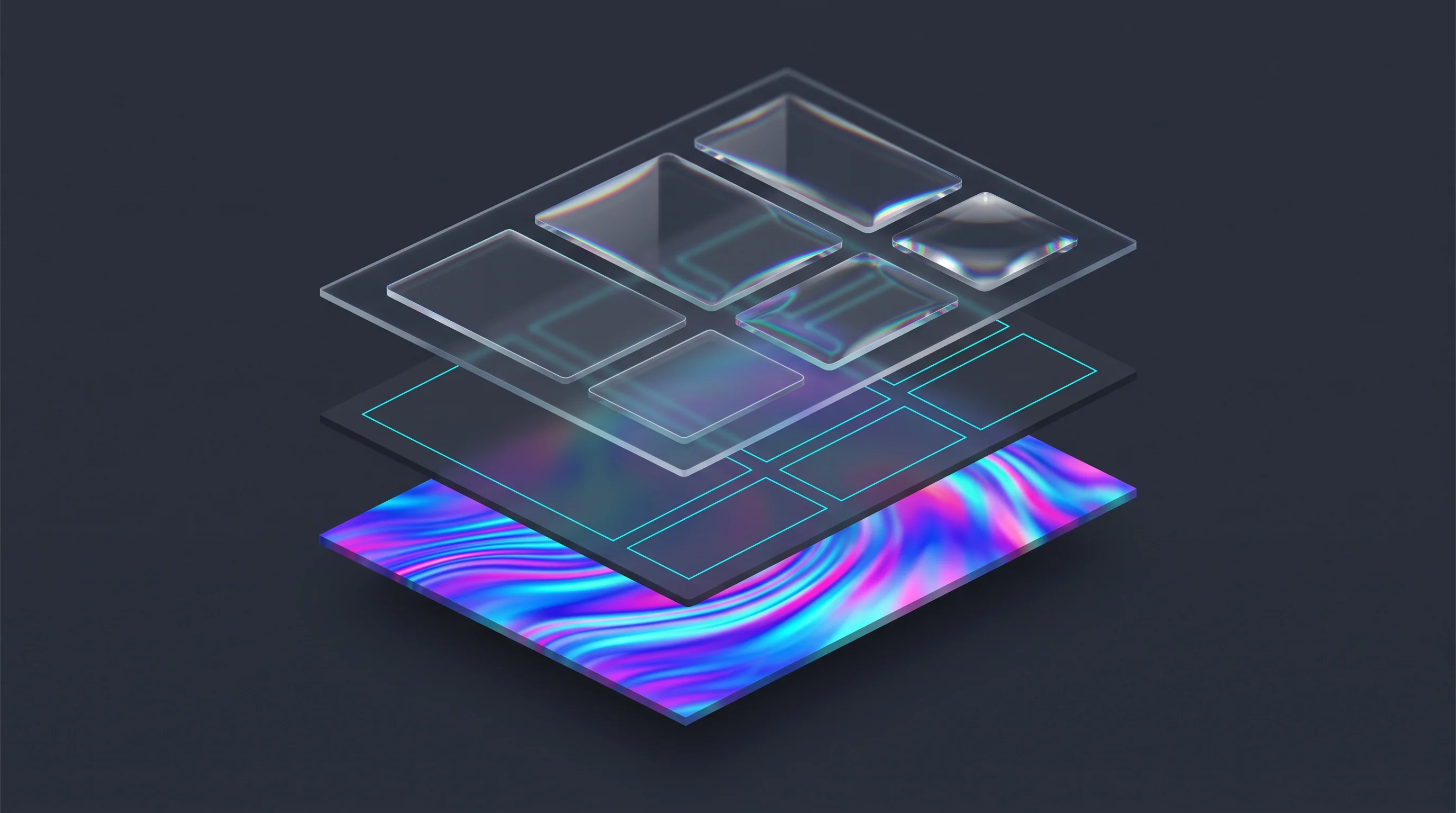
There is exactly one WebGL canvas sitting in the background, pinned fixed across the entire viewport. Every UI element you see on screen, like the work section container or the floating navigation pill, is just a standard HTML div.
When a card mounts, it registers its DOM reference with our central scene manager:
1// Registering an HTML element as an optical lens2export function LiquidGlass({ children, className, ...config }: LiquidGlassProps) {3 const scene = useLiquidGlassScene();4 const elementRef = useRef<HTMLDivElement>(null);56 useEffect(() => {7 const element = elementRef.current;8 if (!scene || !element) return;910 // Registers DOM element bounds and lens parameters with the WebGL engine11 const lensId = scene.registerLens({ element, config });12 return () => scene.unregisterLens(lensId);13 }, [scene]);1415 return <div ref={elementRef} className={className}>{children}</div>;16}
The WebGL engine runs a three-stage render loop every frame:
- WavesPass: Renders the fluid background onto an offscreen framebuffer texture (FBO).
- ScreenPass: Copies that fluid texture to the main screen as the primary backdrop.
- GlassPass: Queries the exact viewport bounding box of each registered DOM element, converts those pixel coordinates into WebGL clip space, and draws a 2D quad right over the element using our custom glass shader.
To the user, it looks like individual glass containers sitting on the DOM. Under the hood, it is a single WebGL canvas painting optical illusions over HTML coordinates.
Making a rectangle refract background pixels realistically requires two things: knowing where the edges are, and knowing the slope of the surface at every single pixel.
1. Rounded Corners with Signed Distance Fields (SDF)
In standard WebGL, drawing smooth rounded rectangles with arbitrary corner radii can get messy if you rely on vertex geometry alone. Instead, we compute the shape inside the fragment shader using a Signed Distance Field:
1// Exact 2D Signed Distance Field for a rounded box2float sdRoundedBox(vec2 p, vec2 b, float r) {3 vec2 q = abs(p) - b + vec2(r);4 return min(max(q.x, q.y), 0.0) + length(max(q, 0.0)) - r;5}
This tiny function takes any pixel coordinate p and tells us the exact Euclidean distance to the rounded perimeter. If the distance is positive, the pixel is outside the card and gets discarded. If it is negative, it is inside.
2. Computing Surface Normals from the Gradient
Glass bends light according to Snell's Law, which depends on the surface normal (the angle of the glass face). Flat glass in the center has a normal pointing straight at the viewer, while beveled edges curve outward.
Instead of hardcoding edge angles, we calculate the surface normal dynamically by sampling the SDF gradient:
1vec2 getBoxNormal(vec2 p, vec2 b, float r) {2 vec2 eps = vec2(0.5, 0.0);3 vec2 grad = vec2(4 sdRoundedBox(p + eps.xy, b, r) - sdRoundedBox(p - eps.xy, b, r),5 sdRoundedBox(p + eps.yx, b, r) - sdRoundedBox(p - eps.yx, b, r)6 );7 float len = length(grad);8 if (len < 0.0001) return normalize(p + vec2(0.0001));9 return grad / len;10}
This produces continuous, smooth vectors across all four corners, completely eliminating ugly corner seam artifacts that usually plague procedural rounded rectangles.
3. Refraction and Chromatic Dispersion
Once we have the normal vector, we distort the background texture coordinates (sampleUv). We also push the Red and Blue channels in opposite directions to simulate chromatic aberration, which is the rainbow-colored fringing you see when light passes through high-density glass:
1// Offset UVs based on bevel depth and surface normal2vec2 offset = refractDir * totalLensUV * lensSize / u_viewport;3vec2 sampleUv = magnifiedUv + offset;45// Base refraction sample6vec4 refrColor = texture2D(u_background, sampleUv);78// Chromatic aberration: split Red and Blue channels9if (aberration > 0.001) {10 vec2 chromaOff = offset * aberration * 3.0;11 refrColor.r = texture2D(u_background, sampleUv - chromaOff).r;12 refrColor.b = texture2D(u_background, sampleUv + chromaOff).b;13}1415// Add specular glint and glass tint16refrColor.rgb = mix(refrColor.rgb, u_tint, 0.08);17gl_FragColor = vec4(clamp(refrColor.rgb, 0.0, 1.0), alpha);
The result is instant eye candy: the background ripples through the card with magnification, bevels, and subtle color dispersion.
Everything was running smoothly on desktop. At 144Hz with a mouse wheel, scrolling through the page felt pristine. The glass lenses hugged the HTML cards with zero latency.
Then we tested it on mobile devices, especially iOS Safari on an iPhone.
When scrolling slowly, it looked fine. But flick your finger fast, and the glass refraction visibly jittered and detached from the card border. It looked like the glass was lagging behind the HTML container, creating an unmistakable wiggle.
We spent days trying to fix it. We tried throttling scroll listeners, interpolating velocity vectors, extrapolating inter-frame deltas, and pre-measuring DOM rectangles. Nothing completely eliminated the jitter on mobile.
Why? Because we ran headfirst into an architectural barrier of modern mobile operating systems.
Main Thread vs. Compositor Thread
Desktop computers have massive power budgets, active cooling, and aggressive clock speeds. On a desktop browser, JavaScript execution and screen presentation happen in near-perfect lockstep.
Mobile devices are different. Battery life is sacred, and CPUs throttle thermal output aggressively. If a mobile browser waited for JavaScript to finish running before updating the screen, scrolling would stutter and drop frames whenever a script did heavy lifting.
To guarantee that touch gestures feel silky smooth, modern mobile browser engines (WebKit in Safari and Blink in Chrome) use an architecture called Asynchronous Pan and Zoom (APZ), also known as Off-Main-Thread Scrolling (OMTS):
- The Compositor Thread (GPU): When your finger touches the glass and flicks upward, the Compositor Thread takes direct control of the display. It translates visual layers at 60Hz or 120Hz ProMotion without asking JavaScript for permission.
- The Main Thread (CPU): This is where JavaScript, React,
requestAnimationFrame, and DOM measurements (getBoundingClientRect) live.
Because the Compositor Thread moves the visual DOM layers independently, JavaScript receives scroll events asynchronously, with a lag of 1 to 2 frames (roughly 16ms to 33ms).
The Phase Shift
Here is what happens during a fast scroll on an iPhone:
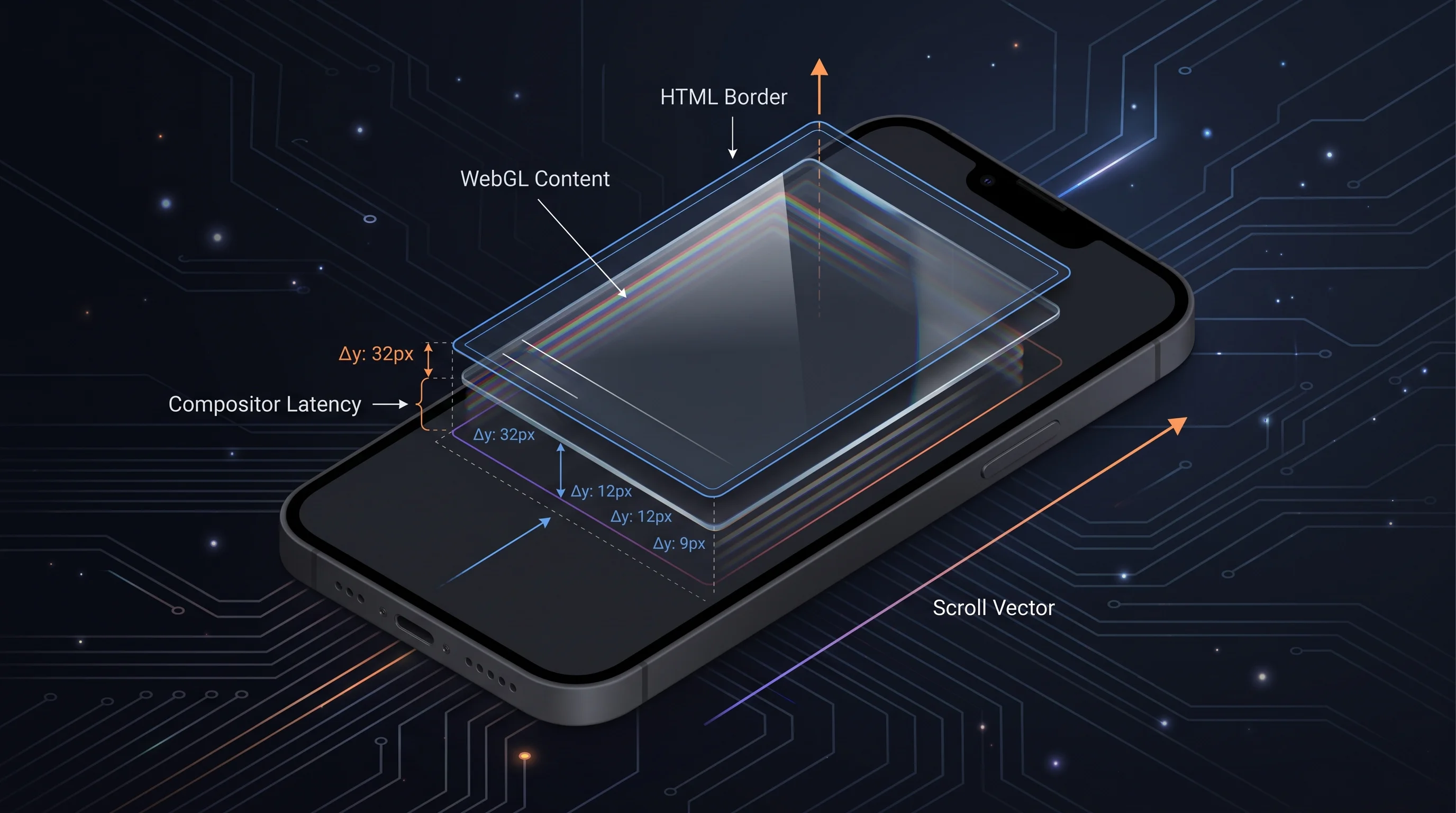
- Frame N: Your finger flicks. The Compositor Thread immediately shifts the HTML card on the screen to coordinate Y = 400px.
- At that exact moment: JavaScript on the Main Thread is still processing Frame N-1. When our WebGL loop calls
getBoundingClientRect(), it reads the previous coordinate: Y = 370px. - The Result: The WebGL shader paints the liquid glass refraction at Y = 370px, while the physical HTML border has already moved to Y = 400px.
By the time the shader catches up to 400px, the compositor has already thrown the card down to 440px.
This spatial discrepancy (phase shift) is what the human eye perceives as a wiggle or lag. In browser engineering, this is documented officially by the W3C and MDN as Scroll-Linked Effect Latency.
If you file a bug report with Apple's WebKit team asking to synchronize JavaScript requestAnimationFrame with the compositor scroll gesture, it gets marked as RESOLVED AS INTENDED (or WONTFIX). Apple intentionally sacrifices JavaScript synchronization to guarantee that touch momentum never stutters.
You cannot outsmart a browser engine that is fundamentally architected to prioritize GPU layer movement over JavaScript thread sync.
Trying to force WebGL multi-lens rendering on small mobile cards while scrolling at high velocity is a fight against the operating system. Furthermore, on phones, mobile GPUs like Mali and Adreno get throttled quickly if they have to run multi-tap procedural refraction shaders across eight cards simultaneously.
The engineering solution came down to graceful degradation:
- On Desktop: The user has a mouse or trackpad, a dedicated GPU, and synchronous scroll coordination. We enable the full multi-lens liquid glass pipeline with border glow physics and chromatic dispersion.
- On Mobile: The main section container retains the full WebGL liquid glass frame, anchoring the visual identity. For individual inner cards, where opaque album art covers 90% of the surface anyway, we switch to clean, hardware-accelerated CSS glass.
CSS renders directly inside the browser Compositor Thread, which means zero frame lag, zero compositor desync, and a solid 120 FPS scroll experience across both Android and iOS.
Building real-time shaders for the web is an incredible creative medium, but building for production means respecting the boundary between what the GPU can calculate and how browser engines choose to draw it.